

Asthma Controller App for Northwestern Medicine: Capmedic BLE, Spirometry Guidance, and Zone-Based Lung Monitoring
AppMatic Tech built the Capmedic asthma controller Android tablet app from scratch in two months for deployment at Northwestern Medicine. AppMatic Tech engineered the native Android (Kotlin) tablet app with Bluetooth Low Energy integration to the Capmedic device, spirometry guidance, lung function testing, zone-based risk monitoring (Red, Yellow, Green), and adherence tracking for 100,000 potential patients in Ahmedabad, India.
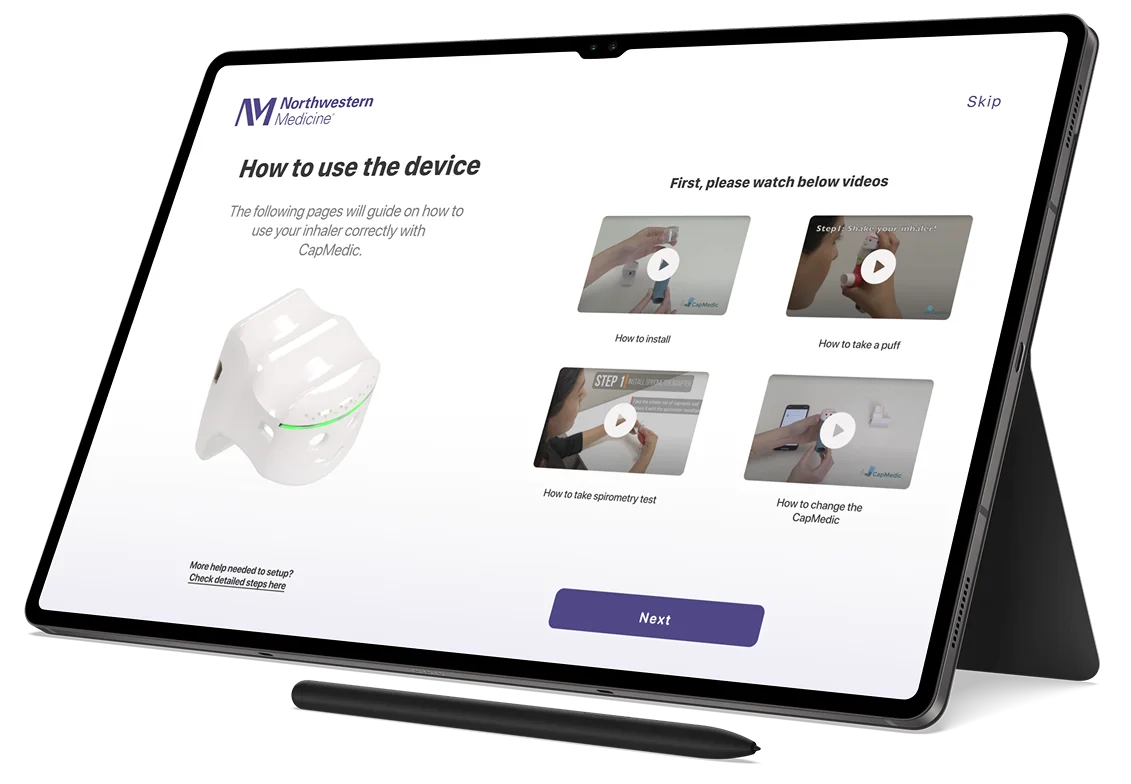
The Challenge: Clinical-Grade IoT Software for a Major US Health Institution, Built at Startup Speed
Building a Bluetooth Low Energy connected asthma controller app for clinical deployment at a major US healthcare institution required the reliability and UX standards of a patient-facing medical tool, delivered in two months. The Asthma Controller Android tablet app had to integrate with the Capmedic device over BLE, provide clear inhaler usage instructions, guide patients through spirometry testing, display lung function test results, and present zone-based health status indicators (Red for danger, Yellow for caution, Green for stable) to patients across a wide range of ages and technical comfort levels. The complete Android tablet app was built from scratch in two months, for a consultant developing the product for Northwestern Medicine, targeting 100,000 potential patients.
Smart Inhaler and Asthma Management App Landscape, Competitive Analysis
AppMatic Tech mapped the smart inhaler and asthma management app competitive landscape during the engagement, identifying the gap between proprietary sensor platforms and the open, Capmedic-integrated clinical tool Northwestern Medicine required.
| Company | Unique Value Proposition | Advantage | Disadvantage |
|---|---|---|---|
 | Smart sensor attachments for inhalers with adherence tracking and environmental trigger alerts | FDA-cleared, strong clinical study backing, integrated with Epic and Salesforce Health Cloud | Proprietary sensor hardware; not compatible with third-party IoT devices like Capmedic. |
 | Smart inhaler sensor with real-time adherence monitoring and reminders | Strong clinical validation, pharmaceutical partnerships, reminders shown to improve adherence | Proprietary hardware only; not designed for integration with third-party clinical IoT controllers like Capmedic. |
 | Patient-facing asthma symptom diary and trigger tracking app | Free, no hardware required, accessible entry point for asthma self-management | Manual data entry only; no BLE IoT device integration, no automatic inhaler event logging. |
 | General health data aggregation with respiratory health data support | Universal platform adoption, familiar to patients, integrates with a wide range of health apps | Not asthma-specific. No inhaler event logging, no BLE device integration, no zone-based lung function monitoring. |
What AppMatic Tech Engineered for the Northwestern Medicine Asthma Controller
AppMatic Tech delivered the full Android tablet app from scratch in two months: Capmedic BLE device integration, inhaler instruction flows, spirometry guidance, lung function testing, zone-based health monitoring, adherence tracking, and clinical API sync.
- Inhaler Usage Instructions
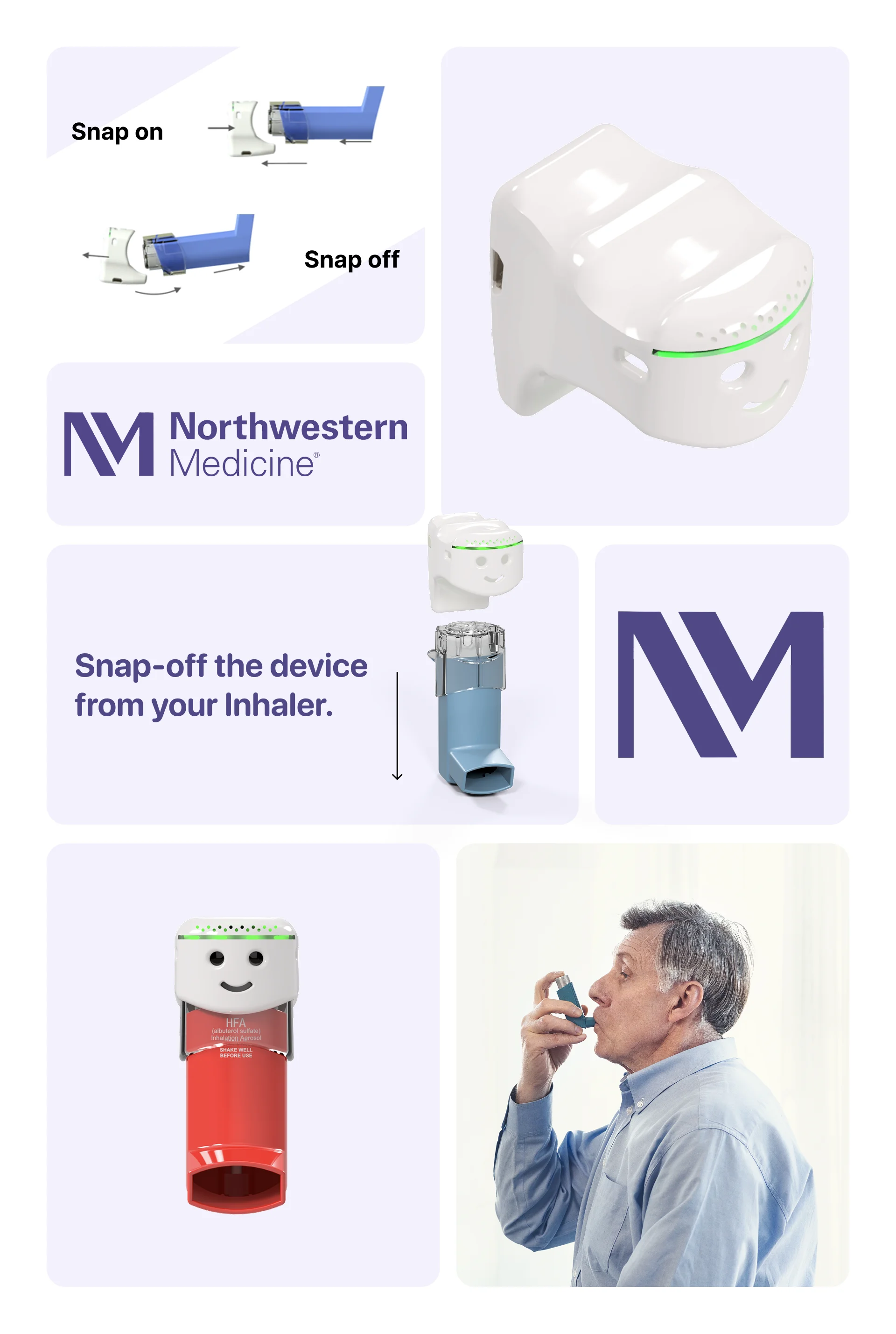
- AppMatic Tech built the step-by-step inhaler instruction module within the Asthma Controller Android tablet app, guiding patients through the correct technique for using the Capmedic inhaler device. Instruction screens were designed for clinical clarity, with large text, simple iconography, and step confirmation, to be usable by patients across all age groups including those with limited digital experience.
- Spirometry Guidance
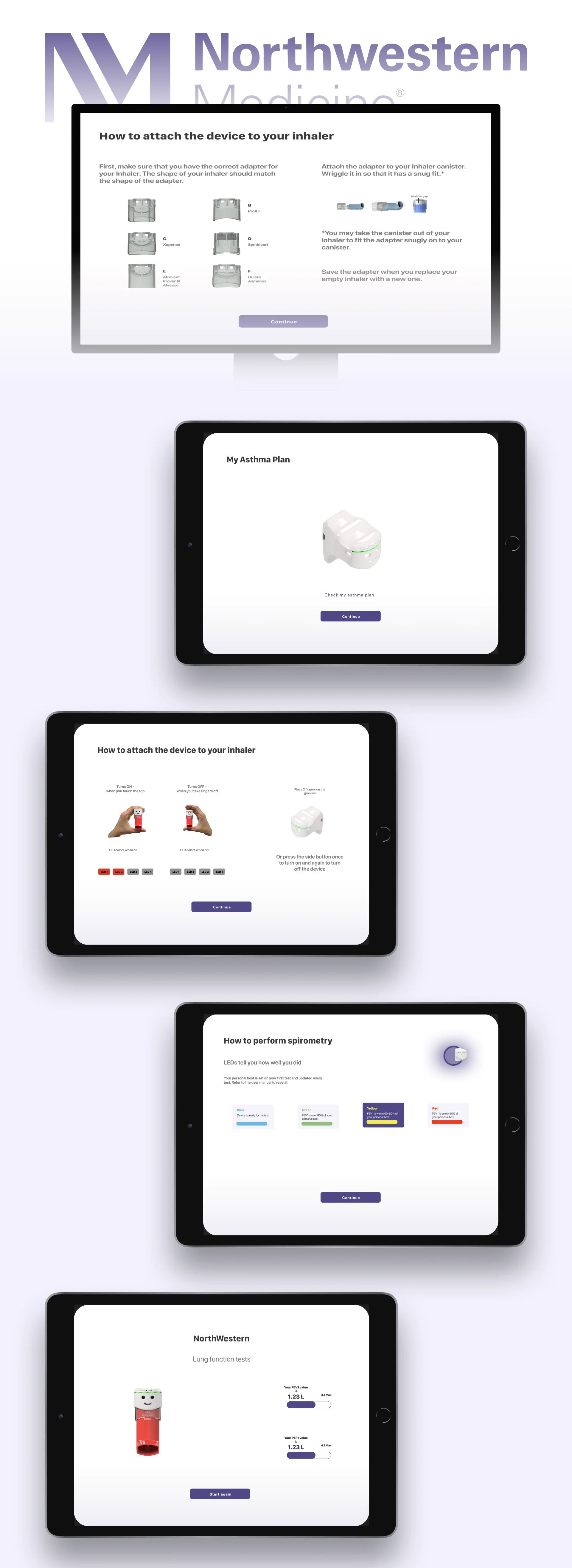
- AppMatic Tech implemented the spirometry guidance module, walking patients through how to correctly perform a spirometry test using the Capmedic device. The module covers patient positioning, breathing technique, test initiation, and result capture, ensuring consistent spirometry execution that meets the data quality standard required for clinical lung function assessment.
- Lung Function Test
- AppMatic Tech built the lung function testing feature, the primary clinical measurement captured by the Capmedic device, presenting test results to patients in a clear, accessible format alongside historical trend data. Lung function test results feed directly into the zone indicator system and sync to the clinical API for provider review.
- Zone-Based Health Monitoring (Red, Yellow, Green)
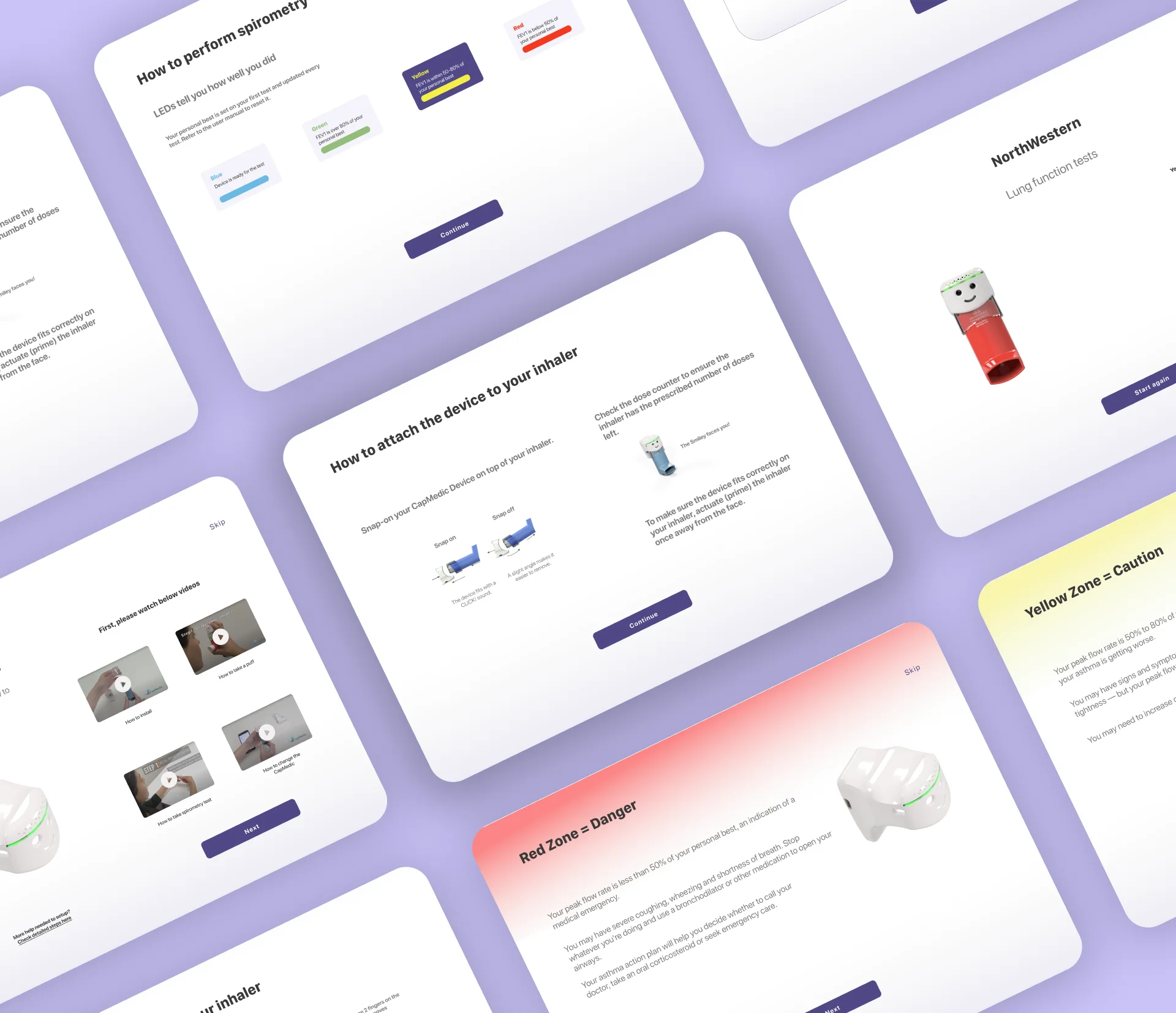
- AppMatic Tech implemented the zone-based health status indicator system: Red (danger), Yellow (caution), and Green (stable). Zone status is calculated from the patient's lung function test results and displayed prominently on the app dashboard so patients can immediately understand their current health status without interpreting raw clinical numbers. Zone thresholds were defined by the clinical team and configured via the admin layer.
- Capmedic BLE Device Integration
- AppMatic Tech implemented the device integration layer connecting the Android tablet app to the Capmedic asthma controller over Bluetooth Low Energy, handling device discovery, pairing, inhaler event data reception, and reliable logging of each usage event. Every medication event captured by the Capmedic device was accurately synced to the patient's adherence record without data loss.
- Clinical API Sync and Adherence Tracking
- AppMatic Tech integrated the clinical API to sync patient lung function results, zone status history, and inhaler adherence data with Northwestern Medicine's systems, enabling healthcare providers to access patient data alongside other clinical records. Adherence tracking presented usage frequency and zone trend data to patients within the app.
Asthma Controller: Delivery Metrics
- MVP Delivery
- 2 months from scratch
- Platform
- Native Android tablet (Kotlin)
- Client
- Northwestern Medicine (via consultant)
- IoT Device
- Capmedic BLE asthma controller
- Key Features
- Inhaler instructions, spirometry, lung function test, Red/Yellow/Green zones
- Potential Users
- 100,000 Northwestern Medicine patients
Asthma Controller Interface Design
AppMatic Tech designed the Asthma Controller Android tablet interface around a single clinical requirement: a patient who has just used their inhaler must be able to confirm the event, check their zone status, and understand their lung function result in under three taps. The zone indicator (Red, Yellow, Green) is the primary visual hierarchy element on the dashboard, colour-coded at a size readable across tablet screen sizes, without requiring the patient to interpret raw clinical numbers. Spirometry and lung function test screens use step-confirmation flows with large interactive elements appropriate for patients who are not digitally native.
"AppMatic Tech delivered a clinical-grade Android tablet app in two months. The Capmedic BLE integration worked reliably from day one and the zone-based UI met the standards we needed for a patient-facing clinical tool. They understood the stakes of building software in a healthcare context."
Northwestern Medicine Project Lead

Asthma Controller Project Outcomes
| Metric | Value |
|---|---|
| MVP Delivery | 2 months from scratch |
| Platform | Native Android tablet (Kotlin) |
| Client | Northwestern Medicine (via consultant) |
| IoT Device | Capmedic BLE asthma controller |
| Key Features | Inhaler instructions, spirometry guidance, lung function test, zone monitoring (Red/Yellow/Green) |
| Potential Users | 100,000 |
Asthma Controller Tech Stack
- Kotlin
- Native Android tablet development
- Android
- Primary app platform
- Firebase
- Push notifications and adherence reminders
- Capmedic BLE
- Bluetooth Low Energy device integration
- Healthcare API
- Clinical data sync and provider records



Mobile-Layer Security on the Asthma Controller
BLE Session Isolation
AppMatic Tech implemented BLE session scoping ensuring each inhaler usage and lung function test session was bound to the authenticated patient's device pairing. The Capmedic BLE connection could not log events or zone data to an unverified or cross-patient session.
Token-Based Session Management
Patient authentication used token-based sessions ensuring adherence records, lung function history, and zone status data were scoped to the verified patient account only, with session termination enforced after inactivity.
API Credential Handling
Backend API credentials used for clinical data sync were not stored in the Android app binary. API calls used authenticated request headers managed at the session layer with no hardcoded credentials in source.
Minimal On-Device Health Data Storage
AppMatic Tech implemented the Android tablet app to minimise on-device health data persistence. Lung function results and zone history were synced to the backend immediately and only cached locally where required for offline resilience.
Push Notification Scoping
Medication reminder and zone alert push notifications were scoped to the device registered to the authenticated patient account, ensuring alerts were not delivered to unintended devices in a shared clinical or household environment.
How AppMatic Tech Built the Asthma Controller App in Two Months
- Discovery and BLE Architecture
AppMatic Tech assessed the Capmedic BLE GATT profile, mapped the inhaler event and lung function data flow from device to API, defined zone threshold logic with the clinical team, and structured the Kotlin Android tablet project with module boundaries for BLE integration, API consumption, and UI.
Days 1–5
- UI/UX Design
AppMatic Tech designed the Asthma Controller tablet interface: zone dashboard (Red/Yellow/Green), inhaler instruction step screens, spirometry guide screens, lung function test result display, and adherence history, with a primary constraint of clarity and accessibility across patient age ranges.
Days 3–10 - Capmedic BLE Integration and Core Build
AppMatic Tech built the Capmedic BLE device integration layer and core Android tablet app in parallel: device discovery and pairing, inhaler event logging, spirometry test capture, lung function result processing, zone status calculation, adherence tracking, and clinical API sync.
Days 8–35 - Clinical QA and Zone Threshold Validation
AppMatic Tech ran clinical-context QA across the full app including BLE pairing reliability, spirometry flow accuracy, lung function result display, zone status triggering at correct thresholds, API sync integrity, and session security edge cases.
Days 32–50 - Deployment and Handoff
AppMatic Tech delivered the production-ready Android tablet build and provided complete technical documentation covering the Capmedic BLE integration, zone threshold configuration, API layer, and deployment runbooks.
Day 60
Services Behind This Build
The Asthma Controller combined native Android engineering, Bluetooth Low Energy device integration, and clinical UX design. Explore the AppMatic Tech services that map directly to this product build.


Explore More Craft
Explore More
Sens
Trackwel
Build a Healthcare IoT App with AppMatic Tech
All projects begin with a no-cost Discovery and Technical Scoping session. Contact the team at contact@appmatictech.com.
Start the Conversation