

SENS: Contactless IoT Temperature Scanner Built During COVID Lockdown, 1M+ Scans Logged
AppMatic Tech, based in Ahmedabad, India, built the complete SENS contactless temperature scanning platform in three months during the COVID-19 lockdown: native iOS and Android apps with BLE command interface, a Laravel backend with real-time WebSocket communication, and an analytics dashboard. The entire BLE integration was engineered without physical device access. SENS logged over one million scans at Hyderabad railways.
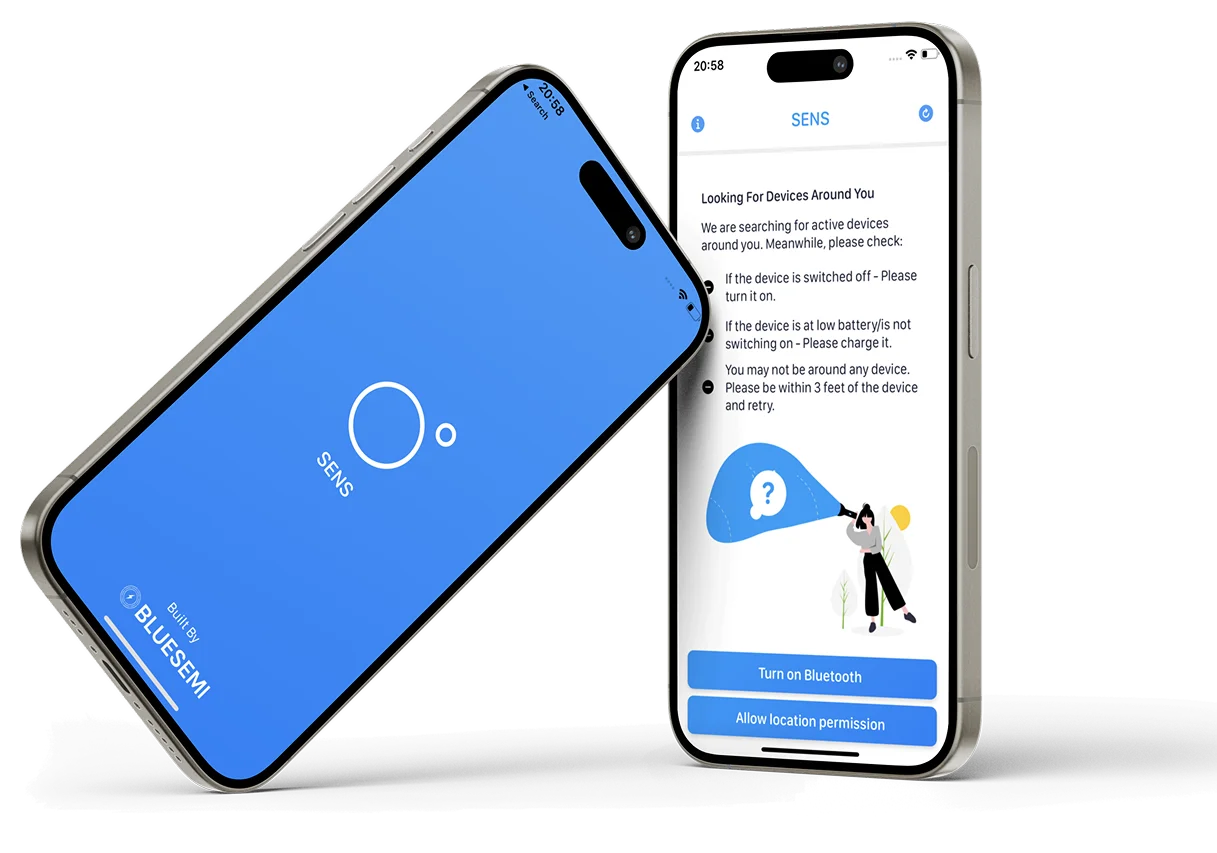
The Challenge SENS Faced Building an IoT Scanning System During COVID Lockdown
SENS required native mobile apps capable of communicating with the IoT scanning device over Bluetooth Low Energy, writing commands to trigger scans and reading temperature results back in real time, while a Laravel backend with WebSocket connections kept an analytics dashboard live with scan data as it happened. The defining engineering challenge was that the COVID-19 lockdown prevented AppMatic Tech from receiving the physical SENS hardware device during development. The entire BLE command interface, scan data pipeline, and real-time WebSocket integration was built, debugged, and tested without direct access to the device. AppMatic Tech mapped the SENS GATT profile from documentation, implemented the read and write command structure, and validated the integration through software simulation. The system worked correctly on first hardware contact. SENS went on to log over one million scans at Hyderabad railways alone.
Contactless Temperature Screening Solutions, Competitive Analysis
AppMatic Tech mapped the competitive landscape during discovery to identify the structural gap between high-cost enterprise thermal systems and the accessible, connected IoT screening product SENS needed to be.
| Company | Unique Value Proposition | Company Advantage | Company Disadvantage |
|---|---|---|---|
 | Thermal Imaging for Large-Area Temperature Screening: FLIR thermal cameras screened multiple people simultaneously at entry points, delivering high throughput for airports, large venues, and critical infrastructure during the pandemic. | High Throughput and Wide Institutional Adoption: FLIR's simultaneous multi-person screening and wide adoption across airports and large venues made it the enterprise standard for high-footfall temperature screening deployments. | High Cost; No Mobile App or Individual Scan Logging: FLIR thermal systems required high hardware investment, dedicated infrastructure, and trained operators, with no mobile companion app or individual scan log for data monitoring across deployment locations. |
 | Consumer-Grade Non-Contact Infrared Thermometers: Braun no-touch thermometers delivered affordable, familiar individual-use temperature measurement with no software setup, widely available across consumer retail channels during the pandemic. | Low Cost and Widely Available: Braun's low price point, consumer familiarity, and retail availability made it the most accessible option for organisations needing rapid basic temperature screening without infrastructure investment. | Manual Operation Only; No Data Logging: Braun thermometers required one-by-one manual operation per scan with no data logging, making them unsuitable for high-footfall deployments requiring automated throughput and centralised scan records. |
 | Medical-Grade Non-Contact Thermometers for Clinical Screening: Jumper medical thermometers provided higher accuracy than consumer alternatives, validated for clinical and screening environments requiring reliable temperature measurement for health monitoring. | Higher Accuracy for Clinical Validation: Jumper's medical-grade accuracy made it the preferred manual thermometer for clinical environments where precision temperature measurement was required for health screening protocols. | Manual Operation Per Scan; No IoT Connectivity: Jumper thermometers required manual operation for each individual scan with no IoT connectivity, no live dashboard, and no centralised logging across multiple entry points or deployment locations. |
 | Enterprise Access Control with Integrated Temperature Screening: HID Global integrated temperature screening into existing enterprise access control infrastructure, combining badging and temperature measurement in a single entry point step for corporate environments. | Integrated Access Control and Temperature in One Step: HID's integration with existing access control infrastructure gave corporate environments a unified entry screening system without deploying separate hardware for temperature measurement. | Enterprise-Only; Requires Existing HID Infrastructure: HID Global temperature screening required existing HID access control infrastructure and enterprise-scale budgets, with no standalone compact device option for mid-size deployments without prior HID investment. |
What AppMatic Tech Engineered for SENS
AppMatic Tech delivered four production systems in three months, all built under COVID lockdown constraints.
- Native iOS App (Swift)
- AppMatic Tech built the SENS iOS companion app with BLE device discovery and pairing for the SENS scanning hardware, BLE command writing to trigger temperature scans, real-time characteristic read and notify handling to receive scan results from the device, live temperature display with pass or fail indication, and WebSocket connection to the Laravel backend for live scan data sync.
- Native Android App (Kotlin)
- AppMatic Tech built the feature-identical Android companion app in Kotlin with BLE scan triggering, real-time result display, and WebSocket sync to the Laravel backend, ensuring the SENS system operated consistently across both major mobile platforms in every deployment environment.
- Laravel Backend with WebSockets
- AppMatic Tech engineered the Laravel backend with persistent WebSocket connections for real-time scan data delivery from mobile apps to the analytics dashboard, scan log storage with timestamp, device ID, and location metadata, user and device management, and the API layer powering the dashboard.
- BLE Command Interface, Built Without Hardware
- The core technical achievement on SENS was the complete BLE command interface built during COVID lockdown without physical access to the SENS device. AppMatic Tech mapped the SENS device GATT profile from documentation, implemented the read and write command structure, and validated the integration logic through software simulation before the hardware was available. The system worked correctly on first hardware contact.
- Analytics Dashboard
- AppMatic Tech built the SENS analytics dashboard with real-time scan data monitoring, individual scan logs with timestamps and location metadata, scan volume reporting across all deployed SENS units, temperature distribution analytics, and device status monitoring.
SENS: Delivery Metrics
- MVP Delivery
- 3 months from zero
- Total Scans Logged
- 1,000,000+ during COVID deployment
- Deployment Scale
- Hyderabad railways, offices, and corporates across the city
- Scan Speed
- Milliseconds per scan
- BLE Development Constraint
- Complete integration built without physical device during lockdown
- Platforms Delivered
- 4: iOS app, Android app, Laravel backend, analytics dashboard
SENS Interface Design
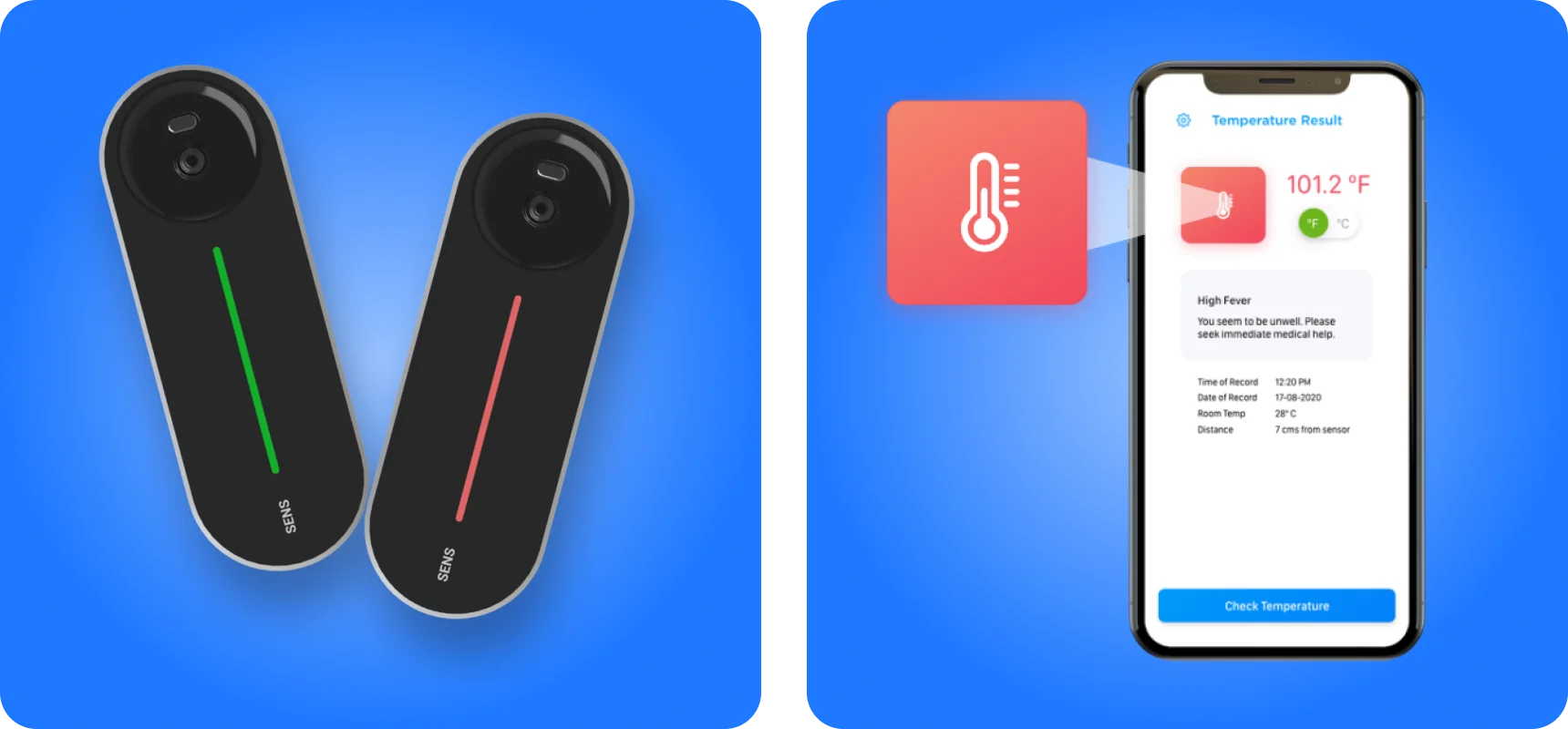
AppMatic Tech delivered the UI design for both the iOS and Android SENS companion apps and the analytics dashboard. The app interface was designed for operational speed: a scan trigger, a result, and a clear pass or fail indicator in the minimum number of taps, suitable for high-footfall deployment environments where operators needed to process people rapidly. The analytics dashboard was designed for monitoring at a glance, with scan volume and temperature distribution visible immediately on load.
"AppMatic Tech built our entire BLE integration during a lockdown, without ever having the device in their hands. When we finally connected the hardware, it worked. That kind of engineering discipline under constraint is what got our product to market when it mattered most."

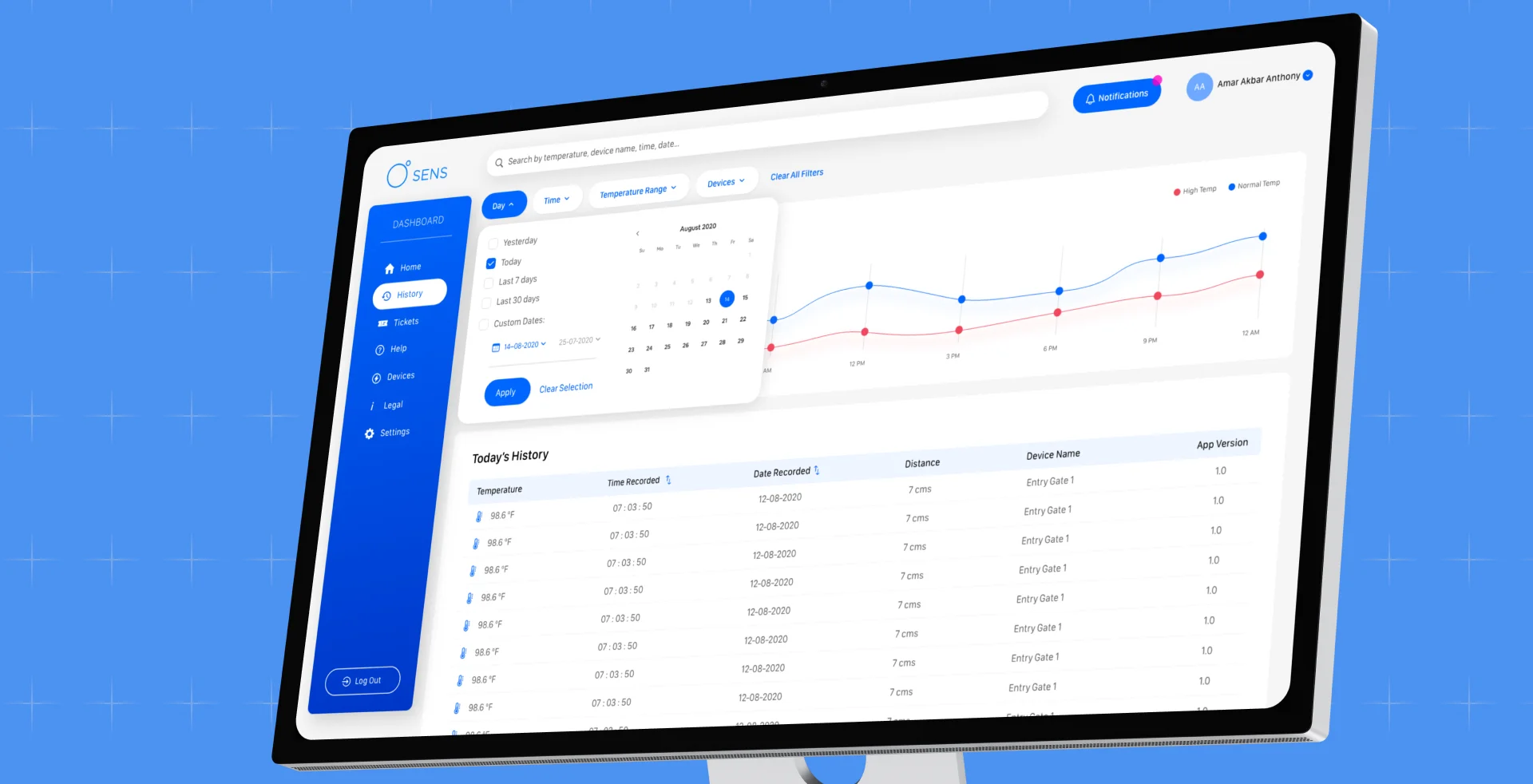
The SENS Analytics Dashboard
AppMatic Tech built the SENS web dashboard as a Socket.io-powered operations hub, receiving temperature scan data from all deployed iOS and Android units in real time over persistent WebSocket connections. Every scan logged in the field appeared on the dashboard within milliseconds of the result being recorded on the mobile app, with no polling or manual refresh required.
- Real-Time Socket Data Feed
- The dashboard maintained a persistent Socket.io connection to the Laravel backend. Each temperature scan triggered by a mobile app was broadcast to the dashboard immediately over the WebSocket layer, keeping live scan counts, device activity, and temperature distributions current across every active deployment location without page reload.
- Device Assignment and Management
- Administrators assigned individual SENS scanner units to specific locations, operators, or deployment zones from the dashboard. Each device appeared in the interface with its connection status, last-seen timestamp, and cumulative scan count, giving operations teams a live view of every unit in the field.
- Ticket and Incident Tracking
- The dashboard included a ticketing layer for flagged scan events. Temperature readings that exceeded the configured threshold automatically generated an incident record with the device ID, location, timestamp, and reading value, giving supervisors an auditable log of every elevated temperature event across all deployment sites.
- Temperature Range Filtering
- Operators could configure pass and fail temperature thresholds per deployment location directly from the dashboard. The filter applied to both the live feed and historical scan logs, enabling temperature range queries across any date range, device, or site, and supporting export of filtered records for compliance reporting.
- Role-Based Auth
- AppMatic Tech implemented a two-tier role system: administrators with full device assignment, threshold configuration, and user management access, and operators with read-only visibility scoped to their assigned deployment locations. Cross-location data access between unrelated operator accounts was blocked at the API layer, ensuring each deployment site retained data isolation.
Mobile Screens
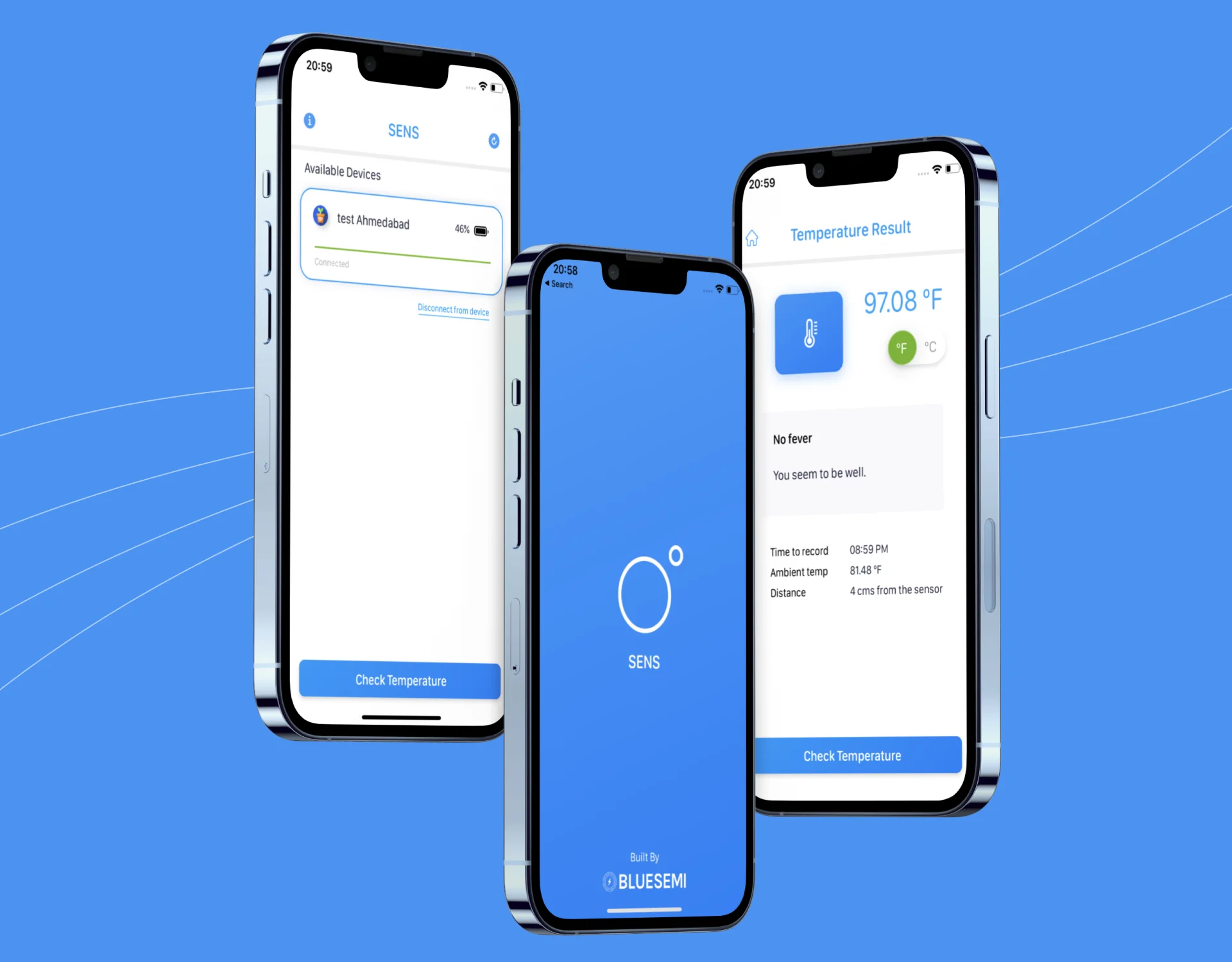
AppMatic Tech designed three core flows for the SENS iOS and Android apps: BLE device discovery, paired device selection, and instant temperature result display with pass or fail indication.
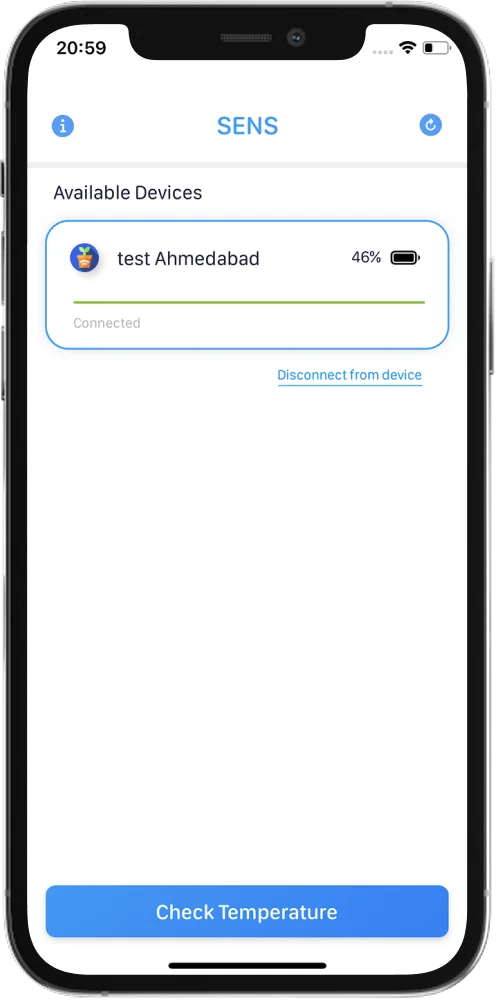
Bluetooth Device Discovery
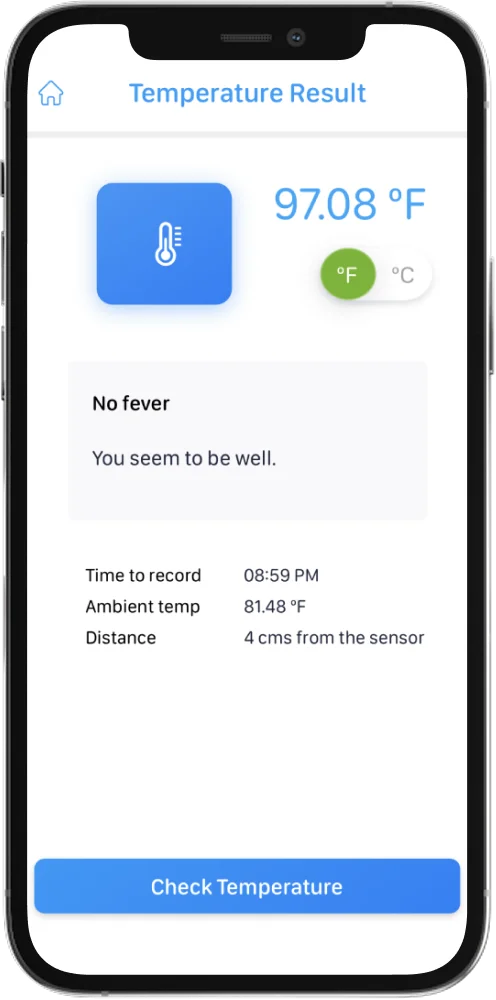
The SENS app opens a BLE scan and surfaces nearby devices immediately. Operators see connection status and signal strength before pairing, with clear guidance for devices that are switched off, low battery, or out of range. The flow was built and validated entirely through software simulation during the COVID-19 lockdown.
Available Devices
Once Bluetooth is active, the app surfaces all SENS units within range with device name and battery level. The operator selects their assigned scanner in one tap and the app establishes a secure BLE session before the scan trigger becomes active.
Temperature Result
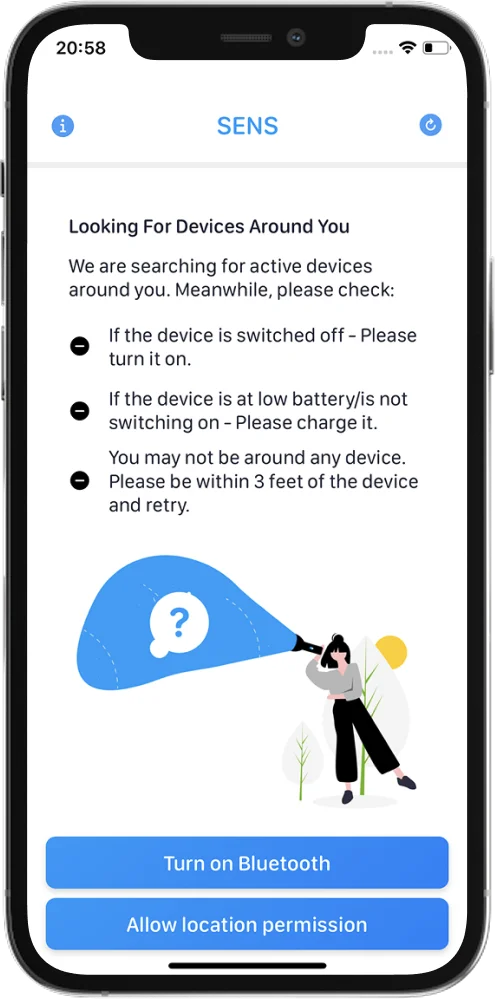
The result screen shows the temperature reading in large type with an immediate pass or fail indication, ambient lamp reading, sensor distance, and timestamp. Each result is written to the Laravel backend over a persistent WebSocket connection in real time, keeping the analytics dashboard current across all deployed SENS units.
SENS Project Outcomes
| Metric | Value |
|---|---|
| MVP Delivery | 3 months from zero |
| Total Scans Logged | 1,000,000+ during COVID deployment |
| Scan Speed | Milliseconds per scan |
| Deployment Locations | Hyderabad railways, offices, and corporates |
| BLE Build Constraint | Full integration built without physical device during lockdown |
| Platforms Delivered | 4: iOS app, Android app, Laravel backend, analytics dashboard |
SENS Tech Stack
- Flutter
- Cross-platform mobile app development
- Dart
- Flutter app language and BLE streaming logic
- Next.js
- Marketing website and hardware purchase flow
- React.js
- Admin panel and frontend components
- Laravel
- Backend APIs, auth, and scan log delivery
- PHP
- Server-side runtime for Laravel backend
- Firebase
- Push notifications and authentication
- AWS S3
- Asset storage and media delivery
- Tailwind CSS
- Admin panel and moderation interface styling
- Postman
- API validation and backend workflow testing
- MySQL
- Relational database for user, scan log, and device data
- Figma
- UI/UX design, prototyping, and handoff
- Google Analytics
- Product usage and engagement measurement
- Latency Testing
- API response time and BLE sync performance benchmarking
- Real-Device Testing
- On-device QA across iOS and Android for BLE pairing and scan flows
- BLE / GATT
- Device hardware integration via custom GATT profile
- WebSockets
- Real-time scan data delivery to dashboard
- Socket.io
- Real-time bidirectional event-based communication














Security Architecture on SENS
- BLE Command Authentication
AppMatic Tech implemented command-level validation on all BLE write operations to the SENS device, ensuring only authenticated app sessions could trigger scans. Unverified BLE connections could not issue scan commands or receive temperature data from the device.
- WebSocket Session Security
All WebSocket connections between the mobile apps and the Laravel backend were authenticated at session initiation, with token-based session management ensuring scan data was only transmitted and stored under verified device and user credentials.
- Scan Data Anonymisation
AppMatic Tech implemented scan log storage without personal identification data by default. Temperature readings were logged with timestamp, device ID, and location metadata, not individual identity, in alignment with the high-throughput screening context where individual identification was not operationally required.
- Dashboard Access Controls
The analytics dashboard required role-based authentication, restricting scan data access to authorised operators and administrators. Individual deployment locations could be scoped to specific operator accounts, preventing cross-location data visibility between unrelated environments.
- Device Command Integrity
AppMatic Tech implemented command integrity checks on all BLE read and write operations, ensuring scan result data received from the SENS hardware was validated before being logged to the Laravel backend, preventing corrupted or spoofed BLE readings from entering the scan record.
 BLE Command Authentication
 WebSocket Session Security
 Scan Data Anonymisation
 Dashboard Access Controls
 Device Command Integrity
How AppMatic Tech Delivered SENS in Three Months During COVID Lockdown
- Discovery and BLE Architecture
AppMatic Tech analysed the SENS device GATT profile from documentation, mapped the BLE command structure for scan trigger and result read, designed the WebSocket data flow from mobile apps to the dashboard, and set up the Laravel, iOS, and Android project scaffolds in parallel.
Week 1
- UI/UX Design
AppMatic Tech designed the SENS app interface for both iOS and Android, covering the scan trigger screen, real-time result display with pass or fail indication, and session history, alongside the analytics dashboard wireframes for real-time scan volume monitoring.
Weeks 1 to 2 - BLE Integration and App Build (No Physical Device)
AppMatic Tech built the complete BLE command interface for iOS and Android simultaneously, using GATT profile documentation and software simulation to implement and validate the scan trigger and result read commands without the physical SENS hardware. WebSocket integration to the Laravel backend was built and tested in parallel. All BLE logic was validated through simulation before any hardware was available.
Weeks 2 to 7 - Backend, Dashboard, and Integration QA
AppMatic Tech delivered the Laravel backend with WebSocket server, scan log storage, and dashboard API, then built the analytics dashboard. Full integration QA across all four systems was completed, covering BLE scan trigger, result receive, WebSocket sync, and dashboard update, validated end-to-end once hardware access was available.
Weeks 7 to 9 - Delivery and Deployment
AppMatic Tech delivered production-ready iOS and Android builds, the deployed Laravel backend, and the analytics dashboard, with complete API documentation, BLE command documentation, and deployment runbooks for the SENS team to scale across railway and corporate locations in Hyderabad.
Week 12
Services Behind This Build
SENS combined mobile app engineering, BLE IoT integration, real-time backend systems, and UI design into one contactless scanning platform. Explore the AppMatic Tech services that map directly to this product build.



Explore More Craft
Explore More
Trackwel
Eyva
Build an IoT or Connected Health Platform with AppMatic Tech
All projects begin with a no-cost Discovery and Technical Scoping session. Contact the team at contact@appmatictech.com.
Start the Conversation