

Music Social Network · Recording, Discovery, and Community in One Interface
AppMatic Tech designed the complete UI/UX for a music social network from scratch for a US-based music platform company: recording, uploading, trending discovery, social feed, and a persistent player in one mode-aware interface for iOS and Android, delivered as a full Figma design system.
Project Overview
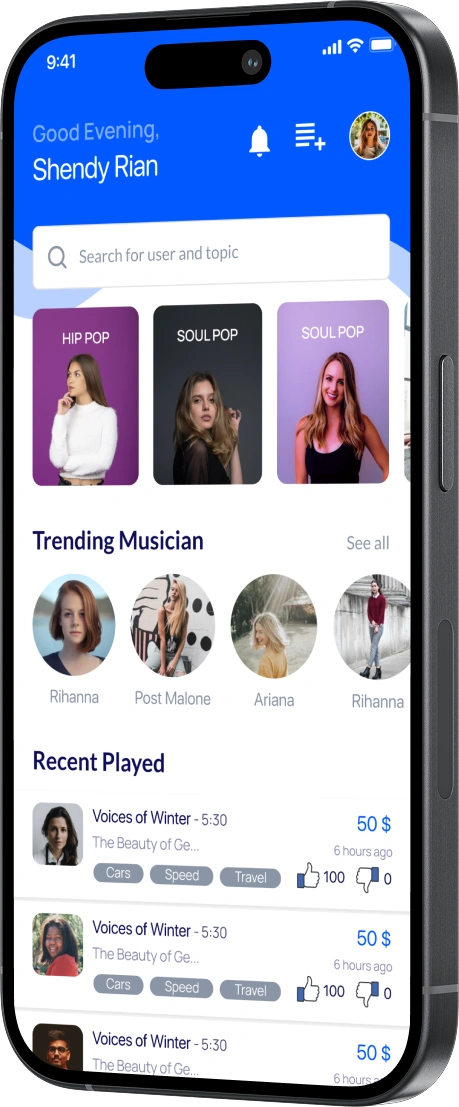
AppMatic Tech designed the complete UI/UX for a music social network from scratch for a US-based music platform company. The app combines music creation (recording and uploading original audio), consumption (player, playlists, trending discovery), and social distribution (community feed, follow, messaging) in a single mobile interface for iOS and Android. AppMatic Tech delivered the full design including user flows, a Figma design system with music-specific components, interactive prototypes, and design handoff documentation.
- Client
- US-based music platform company (name withheld)
- Category
- UI/UX Design, Music, Social
- Platform
- Mobile (iOS + Android)
- Design Tool
- Figma
- Engagement
- Ground-up UI/UX design

The Design Challenge: Creators and Listeners in One App
Music apps serve two user types with competing interface needs. Creators need recording tools, upload flows, and publishing controls. Listeners need a player, discovery, and a social feed. A creator-heavy design with prominent recording tools alienates casual listeners who came to discover music. A listener-heavy design with a buried recording flow discourages creators from uploading the content that makes the platform valuable. The content supply depends on creators. The engagement depends on listeners. Both must feel like the app was designed for them.
AppMatic Tech resolved this tension with a mode-aware interface. The home screen defaults to the listener experience: social feed, trending music, and personalized recommendations are visible without scrolling. The recording flow is accessible from a persistent create button that is always visible but does not dominate the listener navigation. When a user enters recording mode, the interface shifts to a focused creation environment. When the recording is complete, the interface returns to the social feed with the new track ready to publish. The two experiences coexist in one app without either one compromising the other.
What AppMatic Tech Designed
AppMatic Tech designed the full music social app from scratch: the listener-first home, the persistent player, the focused recording mode, the social feed and discovery, and the dark theme system. Every screen and flow below was handed off to the client's development team for implementation.
- Listener-First Home Screen
- AppMatic Tech designed the home screen to open on the social feed with trending tracks and personalized recommendations visible immediately. The listener gets value on first open. A "For You" section surfaces tracks based on listening history and genre preferences. Genre-based browsing and search are accessible from the home screen without navigating to a separate discovery section.
- Persistent Music Player
- AppMatic Tech designed the player as a persistent layer across the entire app. A mini player bar sits at the bottom of every screen showing the current track, progress, and playback controls. Tapping the mini player expands to the full-screen player with album art, waveform progress, queue management, and swipe-to-next discovery. Playback continues uninterrupted during navigation, feed scrolling, profile browsing, and messaging. The player never stops when the user navigates away from it.
- Focused Recording Mode
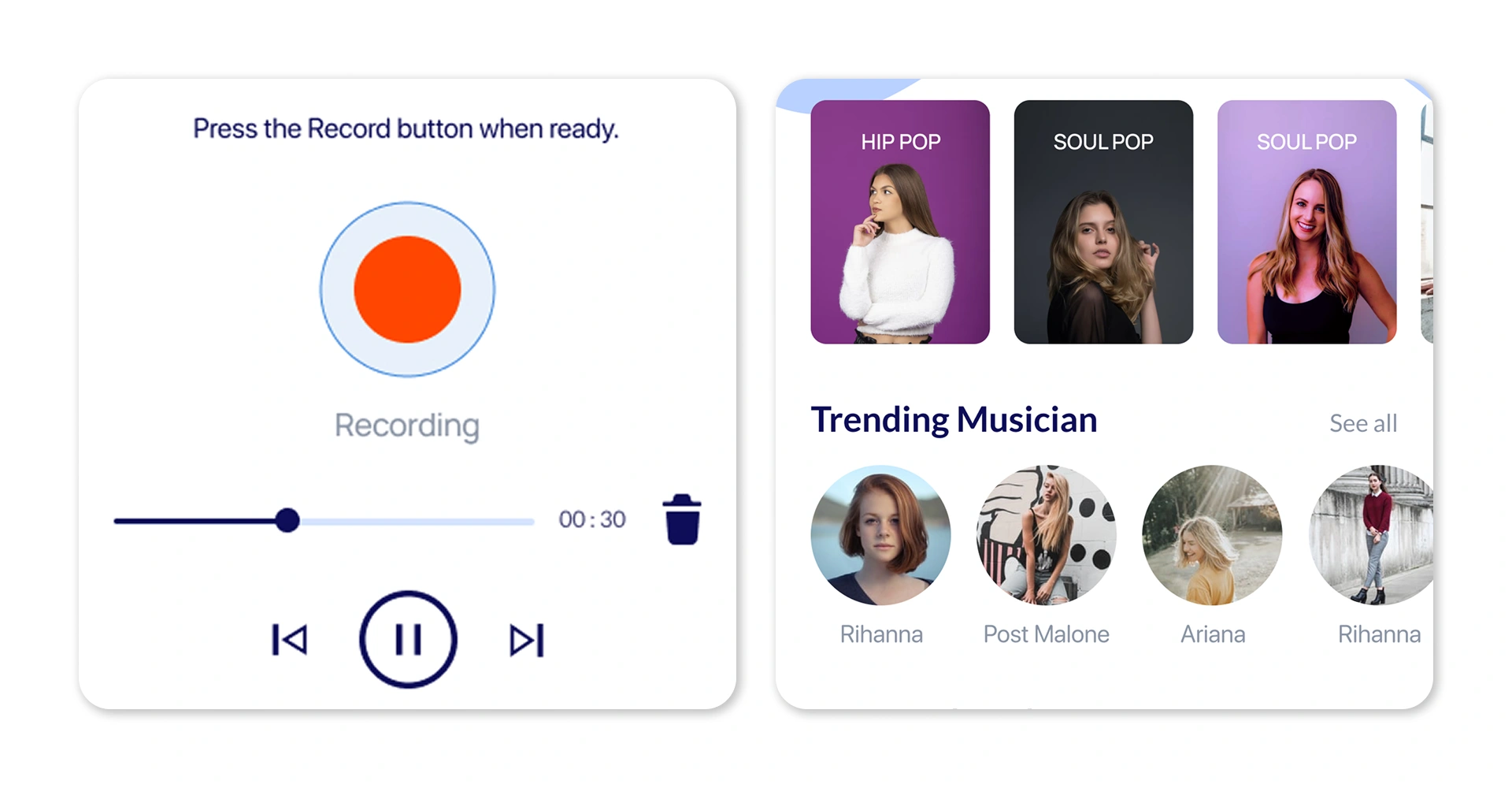
- AppMatic Tech designed the recording flow as a full-screen mode separate from the social interface. The recording screen shows a waveform display, recording controls, and basic editing tools with no social distractions. When the recording is complete, a publish flow captures track metadata: title, genre tags, cover image, and description. Draft state allows users to save unfinished recordings and return later. The mode separation ensures creators are not distracted by notifications during recording, and listeners are not presented with creation tools they do not use.
- Social Feed and Discovery
- AppMatic Tech designed the community feed showing new uploads from followed users with in-feed audio preview, so users hear a track snippet without opening the full player, alongside like, comment, share, and repost actions. User profiles display the artist's track library, follower count, and listening stats. The trending section ranks tracks by plays, likes, and shares within a configurable time window.
- Dark Theme as Default
- AppMatic Tech designed the app with a dark theme as the primary visual mode because music apps are used in low-light environments with headphones and dimmed screens. Dark backgrounds make album art, waveform visualizations, and player controls more visually prominent. The dark palette also reduces eye strain during extended listening sessions and aligns with the visual conventions users expect from audio-focused applications.
What Was Delivered
- Flows
- Record + Play + Share
- Design
- Dark Theme
- Design System
- Figma
- Designed
- From Scratch
AppMatic Tech delivered the complete UI/UX design for the music social app: all screens and flows for recording, playback, feed, discovery, social interaction, and library management. The Figma design system includes reusable components for player controls, waveform displays, track cards, feed items, and profile components. Interactive prototypes cover the recording flow, the player experience, and the social feed. Design handoff documentation provides component specifications, interaction states, and responsive guidelines for the client's development team.
"We had a specific problem: our early designs made the app feel like a recording studio that happened to have a feed. Listeners opened the app and did not know what to listen to. AppMatic Tech flipped it. The app opens on music. The feed is full of tracks. The player never stops. And the recording flow is one tap away but never in the way. That is the balance we could not get right ourselves."
Product ManagerUS-based Music Platform

Key Screens AppMatic Tech Designed
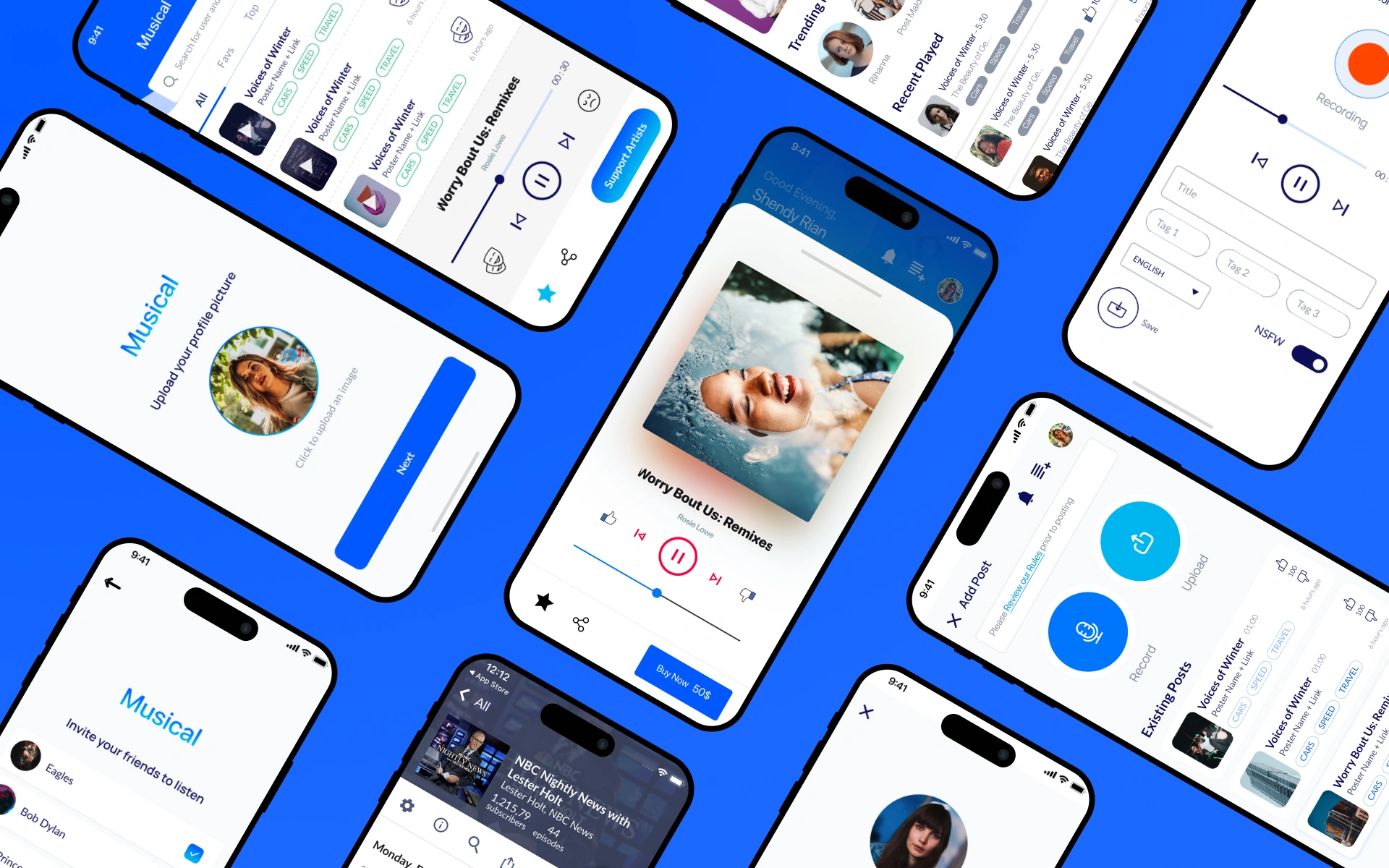
AppMatic Tech designed the three core screens of the music social network: the listener-first home, the focused recording and upload studio, and the persistent full-screen player. Each screen was delivered as part of the Figma design system for the client's iOS and Android development team.
Listener-First Home and Discovery
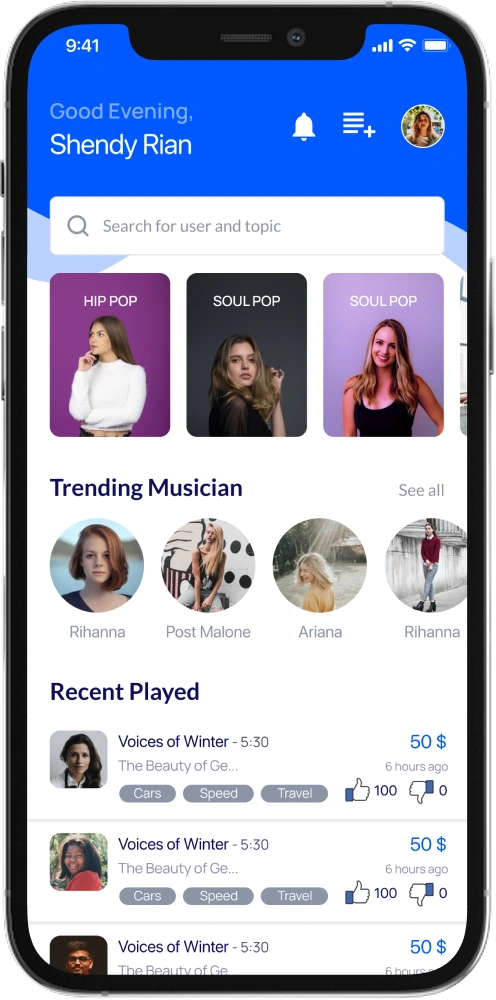
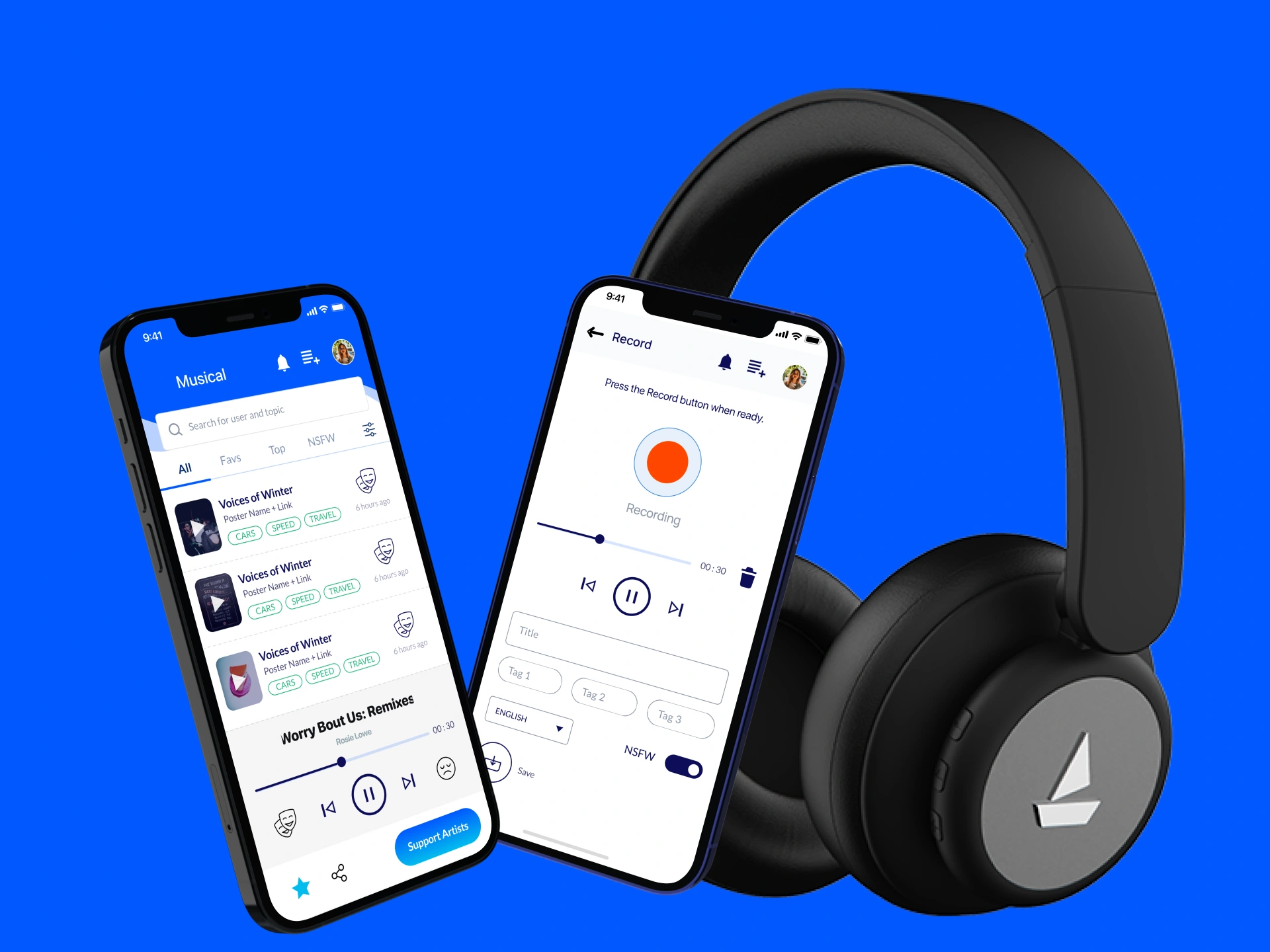
AppMatic Tech designed the home screen to open directly on the listener experience. Trending musicians, genre-based browsing, a search bar, and a recently played list surface music the moment the app opens, so listeners reach content without navigating into a separate discovery section.
Recording and Upload Studio
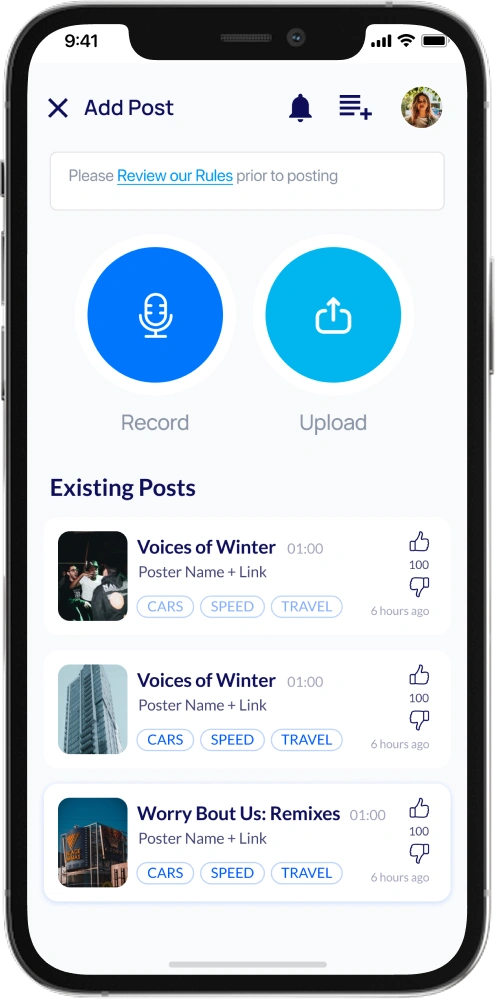
AppMatic Tech designed the Add Post screen as a focused creation mode. Record and Upload actions sit front and center, posting rules appear before submission, and an existing posts list lets creators manage published tracks with genre tags, play counts, and engagement metrics in one view.
Persistent Full-Screen Player
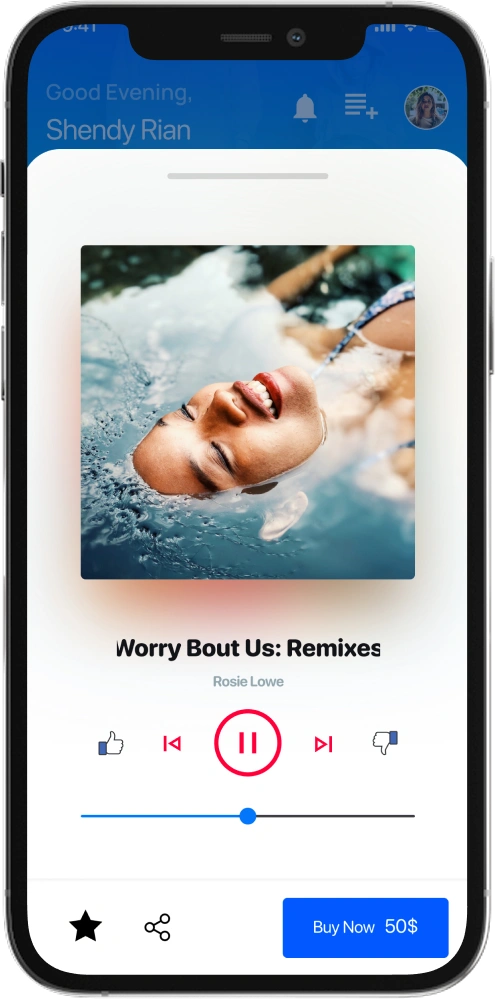
AppMatic Tech designed the full-screen player with album artwork, track title, scrubbing controls, like and skip actions, and a Buy Now option for paid tracks. The player layer persists across the app, so playback continues uninterrupted while listeners browse the feed and discover new music.
Design Stack
- Figma
- UI design, components, and handoff
- Prototyping
- Clickable record, play, and feed flows
- Icon Design
- Custom audio and player icon set
- Waveform System
- Player and recording visualizations
- Dark UI System
- Low-light palette and contrast
- Real-Device Testing
- Layout checks on iOS and Android

Related AppMatic Tech Services
This music social network engagement was UI/UX design delivered to the client's development team. Explore the AppMatic Tech services that extend a design engagement into a shipped product.


Explore More Craft
Explore More
Player FM

Chit Chat
Start a Design Engagement with AppMatic Tech
All projects begin with a no-cost Discovery session. Contact the team at contact@appmatictech.com.
Scope Your Project