

Anvahi: AI Clinical Documentation Platform for Nutritionists and Physiotherapists
Anvahi is AppMatic Tech's own AI-native clinical documentation platform for nutritionists and physiotherapists, built in two months and validated by 100+ practitioners. AppMatic Tech engineered the full platform: Flutter mobile app, web app, a practitioner-validated AI transcription pipeline, and a SOAP and custom template engine that generates structured clinical notes from recorded consultation sessions in seconds.
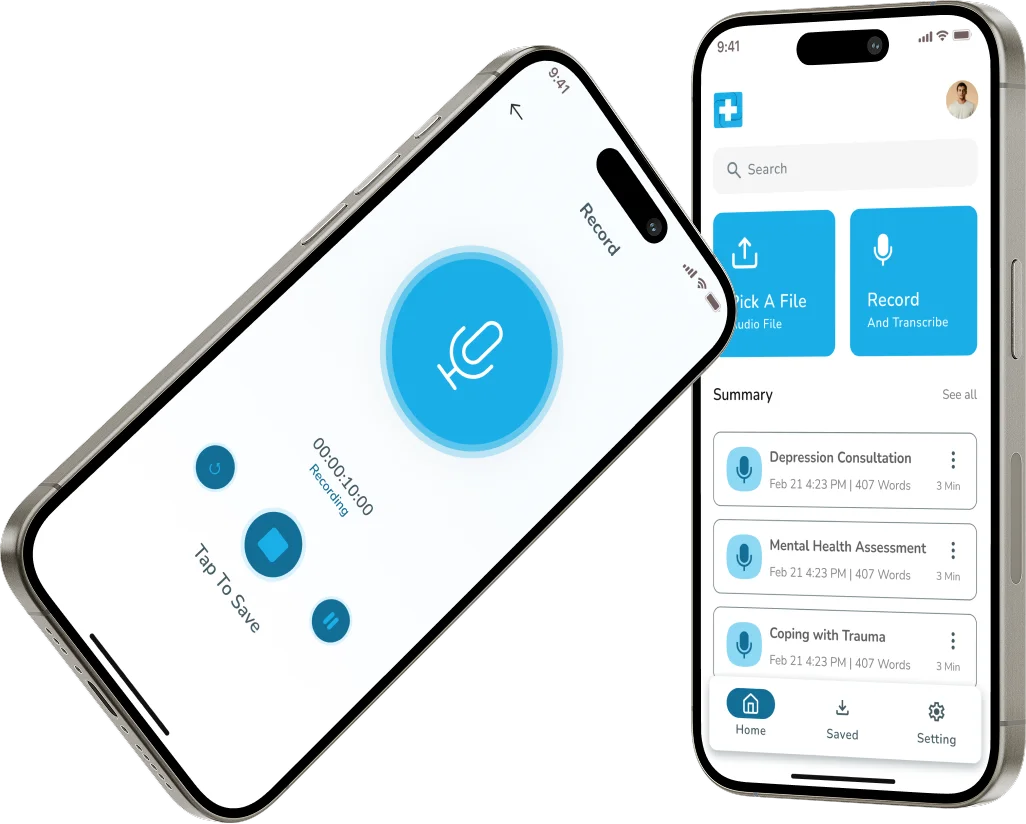
The Problem Anvahi Solves: Clinical Note-Writing Takes Longer Than the Session Itself
Clinical note-taking is one of the most time-intensive administrative tasks for nutritionists and physiotherapists, with practitioners frequently spending as much time writing session notes as they spend with patients. Existing tools either require manual transcription, produce inaccurate outputs that need heavy editing, or do not support the structured clinical formats, including SOAP and others, that practitioners need for record-keeping and documentation. Anvahi was built by AppMatic Tech to eliminate this friction: AI-powered transcription validated on real clinical recordings, structured note output in the practitioner's preferred clinical format, and a custom template directory that grows with the practitioner's workflow. AppMatic Tech designed, built, and validated the entire platform in two months, then tested it with over 100 nutritionists and physiotherapists.
AI Clinical Documentation Tools, Competitive Analysis
AppMatic Tech mapped the clinical documentation AI landscape to identify the gap between general-purpose transcription tools and the structured, template-driven clinical note format that nutritionists and physiotherapists specifically require.
| Company | Unique Value Proposition | Company Advantage | Company Disadvantage |
|---|---|---|---|
 | AI-Powered Meeting Transcription for General Business Use: Otter.ai delivered high-accuracy real-time transcription with speaker identification for business meetings, widely adopted across professional contexts requiring recorded conversation summaries. | High Transcription Accuracy and Wide Adoption: Otter.ai's transcription accuracy and established user base across business meetings made it the default general-purpose transcription tool for professionals who needed quick, reliable conversation records. | No Clinical Note Output; No SOAP Template Support: Otter.ai was not designed for clinical documentation and produced no SOAP note output, no clinical template directory, and no structured note generation for healthcare practitioners working in allied health specialties. |
 | AI Clinical Note Assistant Trained on Medical Conversations: Nabla Copilot was trained on clinical conversations to generate structured notes for physicians, with EHR integration across major systems including Epic, positioning it as a physician-led documentation assistant. | Strong Clinical Accuracy for Physician Consultations: Nabla's clinical training and EHR integration made it the leading AI documentation assistant for physicians operating within established hospital and clinic systems using major EHR platforms. | Physician-Focused; Limited Allied Health Template Flexibility: Nabla Copilot was tailored for physician-led consultations and lacked the template flexibility required by nutritionists and physiotherapists operating outside the physician specialty context. |
 | AI Medical Scribe Across Clinical Specialties: Heidi Health provided AI medical scribe functionality for clinical documentation across multiple specialties, generating structured SOAP note output with a practitioner-friendly review interface. | Multi-Specialty Support and Clean Practitioner UI: Heidi's multi-specialty coverage and clean review interface gave it broad clinical adoption across GP and specialist contexts, with structured SOAP output that reduced post-session documentation time. | Broader Focus Reduces Depth for Allied Health Practitioners: Heidi Health's broader specialty focus reduced its depth for nutritionist and physiotherapy-specific templates, with less support for the custom template directories allied health practitioners needed for practice-specific documentation. |
 | Meeting Recording and Transcription Within Existing Video Infrastructure: Microsoft Teams and Zoom provided built-in meeting recording and transcription for practitioners already conducting telehealth consultations, with zero additional tool switching cost. | Zero Switching Cost for Existing Platform Users: Practitioners already using Teams or Zoom for telehealth could access transcription without adopting a new platform, reducing adoption friction for basic consultation recording needs. | Transcription Only; No Clinical Note Generation: Neither Teams nor Zoom generated clinical notes from transcription. Practitioners received raw transcription only, requiring manual conversion into SOAP or any other clinical format note structure. |
What AppMatic Tech Built for Anvahi
AppMatic Tech built every layer of the Anvahi platform from scratch in two months.
- Flutter Mobile App
- AppMatic Tech built the Anvahi Flutter mobile app for practitioners to record patient consultation sessions, select note templates from the Anvahi template directory including SOAP and custom formats, review and approve AI-generated session notes, manage patient session history, and export notes in preferred formats. The mobile app is the primary recording interface for practitioners in clinic.
- Web App
- AppMatic Tech built the Anvahi web application as the full-featured practitioner dashboard, covering session history, template directory management, note review and editing, export, and account management. Practitioners on desktop-based workflows can record, review, and manage all clinical documentation from the web app.
- AI Transcription Pipeline
- AppMatic Tech engineered the AI transcription pipeline that converts recorded consultation audio into text, validated on real consultation recordings with nutritionists and physiotherapists before launch. The pipeline was designed for the clinical conversation context where practitioners and patients use a mix of clinical terminology, common language, and practitioner-specific vocabulary.
- SOAP and Custom Note Template Engine
- AppMatic Tech built the Anvahi template directory, a structured system where practitioners store SOAP format templates and any custom note structure their practice requires. When a session is transcribed, the AI note generation layer maps the clinical content to the selected template and outputs correctly formatted notes without manual reorganisation by the practitioner.
- UI/UX Design for Clinical Workflow
- AppMatic Tech designed the Anvahi UI/UX for the practitioner workflow context: fast session start, minimal in-session interaction, and a clean post-session review flow where the practitioner can approve, edit, and export notes in under two minutes per session.
Anvahi by the Numbers
| Metric | Value |
|---|---|
| MVP Delivery | 2 months from scratch |
| Platforms Delivered | Flutter mobile app, web app, AI transcription pipeline, SOAP template engine |
| Beta Practitioners | 100+ nutritionists and physiotherapists |
| Transcription | Practitioner-validated on real clinical recordings |
| Note Formats | SOAP + custom template directory |
| Product Type | AppMatic Tech in-house product |
| Outcome | MVP validated with real clinical practitioners before public launch |


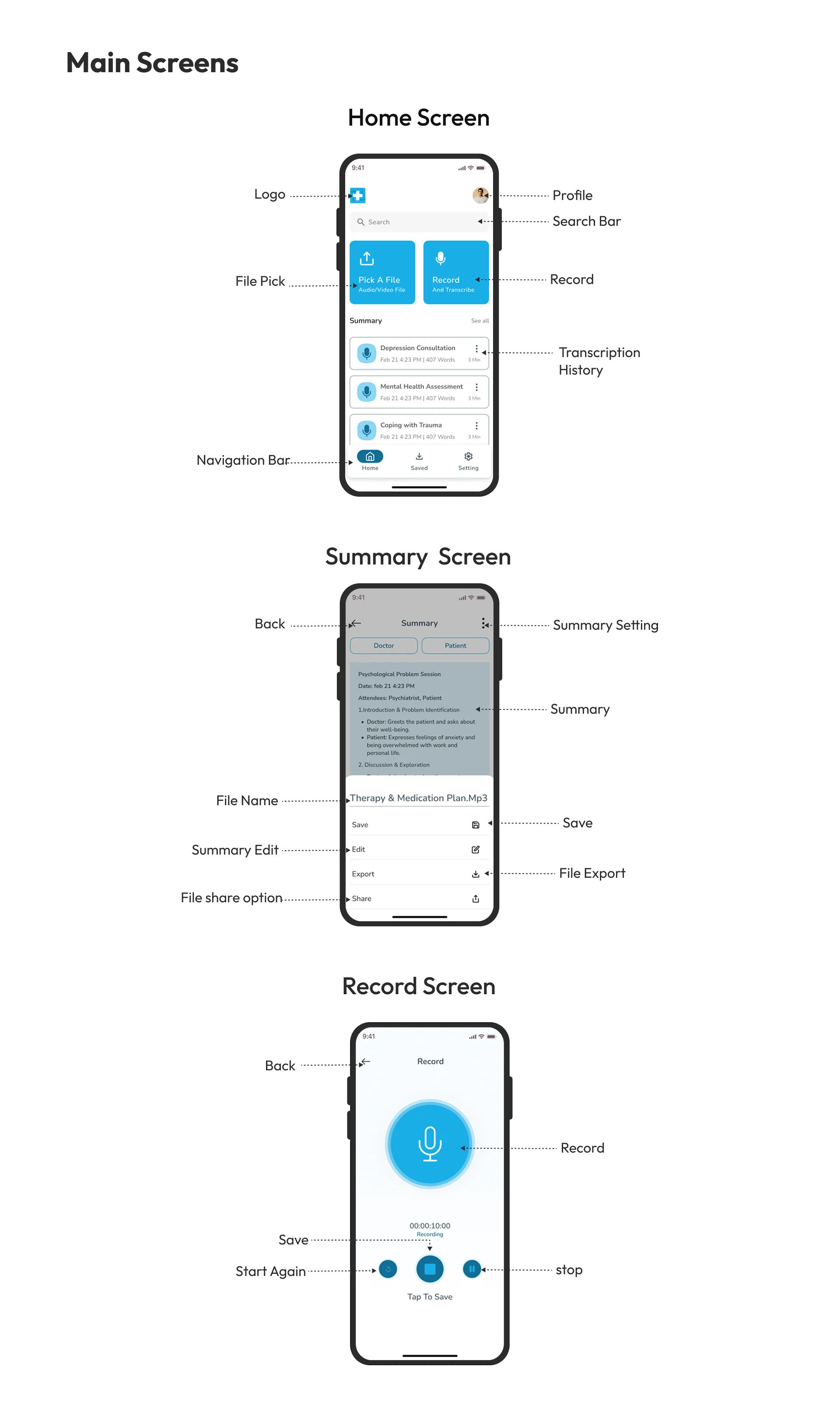
Anvahi Interface Design
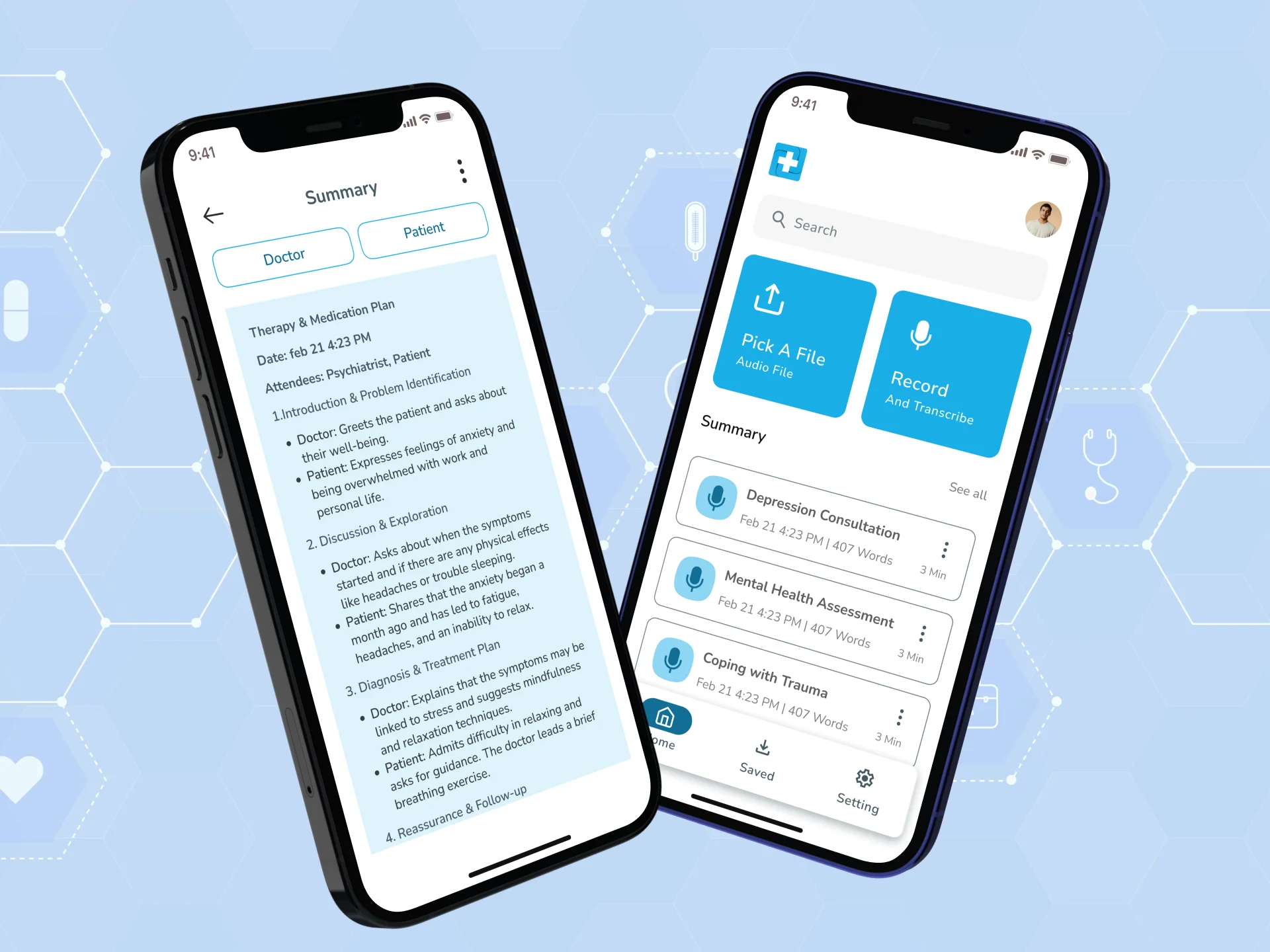
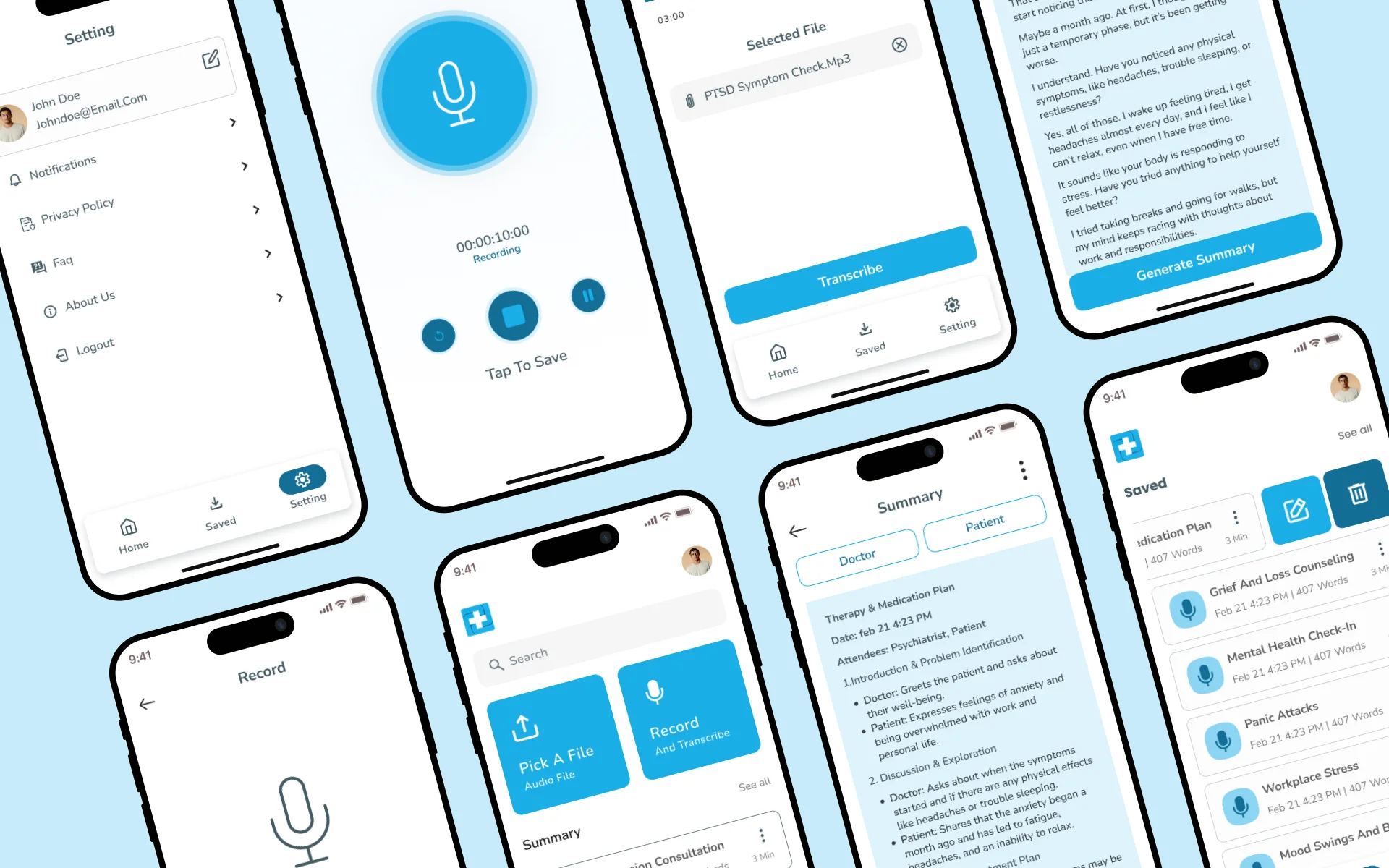
AppMatic Tech designed the Anvahi UI/UX across both the Flutter mobile app and the web app with one primary constraint: the practitioner is busy, often between patients, and the note review and export flow must be completable in under two minutes from session end. The session recording screen was designed for zero-distraction operation, one tap to start and one tap to stop. The note review screen presents the AI-generated structured notes in the selected template format immediately on session end, with inline editing before export.
Typography & Color
ABCDEFGHIJKLMNOPQRSTUVWXYZ
abcdefghijklmnopqrstuvwxyz
1234567890
Nunito is a well-balanced sans-serif typeface with a modern, friendly feel, designed for readability across digital interfaces. It features smooth, rounded letterforms that enhance clarity and visual appeal.
Color Palette
"We built Anvahi because we saw how much time nutritionists and physiotherapists were losing to manual note-writing after every session. The AI pipeline produces structured SOAP notes from a recorded consultation in seconds. After testing with 100+ practitioners, the accuracy and format quality exceeded what we expected from a two-month build."

How Anvahi Works for Clinicians
Anvahi reduces the post-consultation documentation burden from 15–25 minutes per session to under 60 seconds. Three core capabilities drive that outcome.

Session Recording
Practitioners start a one-tap recording at the beginning of a consultation. Anvahi captures clear audio in the background while the clinician focuses entirely on the patient. No special hardware or external microphone is required. The recording is stored locally and uploaded to the AI pipeline only when the session ends, keeping patient data under practitioner control at all times.
- One-tap record and stop
- Background audio capture
- Local-first storage with end-of-session upload
AI Transcription and SOAP Note Generation
Once the recording ends, Anvahi's AI pipeline transcribes the conversation, identifies clinical context, and maps findings to a structured SOAP format — Subjective, Objective, Assessment, Plan. The generated note is ready for review in seconds and includes discipline-specific language appropriate for nutrition or physiotherapy consultations. Practitioners edit inline before saving.
- Full audio-to-SOAP pipeline
- Nutrition and physiotherapy specialisation
- Inline editing before finalising


Template Management
Every clinician works differently. Anvahi's template engine lets practitioners build and save custom note formats that match their clinic's workflow, referral requirements, or personal preference. Templates can be assigned per patient type, ensuring every note follows the correct structure without manual reformatting. The template directory is fully searchable and editable from both mobile and web.
- Custom SOAP template builder
- Per-patient-type template assignment
- Accessible on mobile and web
Key Features Ensuring Ease of Use
Minimalistic UI
- Clean one-screen-at-a-time layout, no cluttered dashboards
- Large tap targets optimised for clinical environments
AI-Powered Documentation
- Audio-to-SOAP pipeline runs in the background post-session
- Discipline-aware language for nutrition and physiotherapy
Quick Navigation
- Patient records, session history, and notes accessible in two taps
- Universal search across sessions and templates
Customization
- Build and save custom SOAP templates per patient type
- Override any AI-generated field before finalising a note
Anvahi: Platform Outcomes
| Metric | Value |
|---|---|
| MVP Delivery | 2 months from scratch |
| Platforms | Flutter mobile app + web app + AI pipeline + template engine |
| Beta Practitioners | 100+ nutritionists and physiotherapists |
| Transcription Accuracy | Practitioner-validated on real clinical recordings |
| Note Formats | SOAP + custom template directory |
| Product Type | AppMatic Tech in-house product |
Anvahi Tech Stack
- Flutter
- Cross-platform mobile app development
- Dart
- Flutter app language and pipeline integration
- Laravel
- Backend APIs, AI proxy, and data models
- PHP
- Server-side runtime for Laravel backend
- React
- Web app frontend
- Firebase
- Push notifications and FCM delivery
- AI Transcription
- Practitioner-validated clinical audio pipeline
- LLM Notes
- SOAP and template note generation
- AWS S3
- Audio recording storage and asset delivery
- MySQL
- Relational database for practitioners, sessions, and templates
- Figma
- UI/UX design, prototyping, and handoff
- Postman
- API validation and backend workflow testing
- Google Analytics
- Product usage and engagement measurement
- Latency Testing
- AI pipeline response time and delivery benchmarking
- Real-Device Testing
- On-device QA across iOS and Android hardware
- Jenkins
- Build automation and deployment pipeline












Security Architecture on Anvahi
- Patient Consultation Data Isolation
Anvahi stores consultation recordings and generated notes scoped strictly to the authenticated practitioner account. No cross-practitioner data access paths exist in the app or API layer, ensuring patient session data remains accessible only to the practitioner who recorded it.
- Token-Based Session Management
Practitioner authentication uses token-based sessions with server-side expiry. Consultation recordings, AI-generated notes, and template directories are accessible only under verified, active practitioner sessions.
- Secure Audio Transmission
Consultation audio recordings are transmitted to the AI transcription pipeline over encrypted transport with no plaintext audio exposure. Recordings are processed and managed in accordance with practitioner data retention preferences.
- Note Export Controls
Note export flows require authenticated session confirmation before any patient session data leaves the Anvahi platform, ensuring clinical notes are only exported by the practitioner who owns the session record.
- Minimal Patient Identity Collection
Anvahi was designed with minimal patient identity collection. Practitioners manage patient identification in their own practice management systems. Anvahi stores session recordings and generated notes without requiring personally identifiable patient data to be entered into the platform.
 Patient Consultation Data Isolation
 Token-Based Session Management
 Secure Audio Transmission
 Note Export Controls
 Minimal Patient Identity Collection
How AppMatic Tech Built Anvahi in Two Months
- Product Discovery and AI Architecture
AppMatic Tech defined the Anvahi product scope from practitioner research, identified the most time-consuming note formats with SOAP as the primary, mapped the AI pipeline from recording to transcript to structured note output, and set up the Flutter, web app, and backend project scaffolds.
Days 1 to 5
- UI/UX Design
AppMatic Tech designed the Anvahi interface across Flutter and web, covering the session recording screen, template selector, AI note review and edit screen, template directory management, and session history, with under two minutes from session end to exported note as the primary UX design benchmark.
Days 3 to 10 - AI Pipeline and Core App Build
AppMatic Tech built the AI transcription pipeline and the SOAP template engine in parallel with the Flutter mobile app and web app. Transcription accuracy on real nutritionist and physiotherapist consultation recordings was the primary QA benchmark throughout this phase.
Days 8 to 40 - Beta Testing with 100+ Practitioners
AppMatic Tech released Anvahi to a beta group of 100+ nutritionists and physiotherapists, collecting accuracy feedback on transcription output, note structure quality per template, and UI workflow friction. Findings were iterated on before the public MVP launch.
Days 35 to 55 - MVP Launch
AppMatic Tech launched Anvahi publicly following successful beta validation, with the Flutter app submitted to App Store and Google Play, the web app deployed, and the AI pipeline scaled for production practitioner load.
Day 60
Services Behind This Build
Anvahi combined mobile, web, AI pipeline, and clinical UX into one product. Explore the AppMatic Tech services that map directly to this build. See the startup software development hub for similar builds.

Explore More Craft
Explore More
Eyva
Trackwel
Build an AI-Powered Mobile App with AppMatic Tech
All projects begin with a no-cost Discovery and Technical Scoping session. Contact the team at contact@appmatictech.com.
Build similar AI-app now